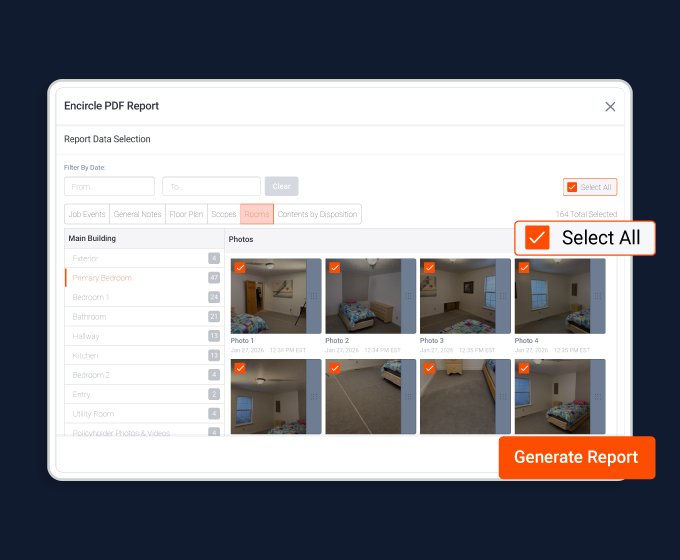
In restoration, profits are made in the field, but success is managed in the office. That’s where the Encircle web app comes in. The web app is your command center, the place where all the photos, notes, floor plans, moisture readings, and signatures from the field come together in real time. It gives you visibility into every job, so you can make faster, smarter decisions without chasing updates or waiting for uploads. In this course we’ll walk through how to use the Encircle web app to manage claims efficiently, keep your projects on track and help your business run smoothly. When you first log in to the Encircle web app, you’ll land in the Inbox, your home base. On the left side of the page is the navigation bar. From here you can start a new job, access the job list, manage payments, open your org settings, launch the Learning Hub, and search our Help Center. In the Inbox you’ll see all of the jobs your team is working on. Use the search bar up top to find a specific job and use the filtering options at the top right to view all jobs, just the ones you’re shared on, or a custom view. Custom filters allow you to group jobs by date range, insurance company, adjuster, project manager, and more. Having your own custom views in the Inbox helps you to access the job files you need, faster. At a glance, the Inbox tells you what’s happening in the field. The little orange activity dots show you when new data has been added, so you always know which files have been updated since you last checked. Click the eye icon to preview a claim’s activity feed without opening the full file. It’s like a live news feed of everything happening on that job – photos, notes, reports, alerts, and more. At the top right, you’ll see your notifications. You’ll get these when there’s an update on certain high priority actions, such as a customer signature on a form, or a report or floor plan that has finished processing. The Inbox gives you instant visibility. Instead of chasing technicians for updates, you can see exactly where every job stands, and act on that information right away. New job files are easy to get set up quickly. To start a new job, click the plus button in the left hand menu from anywhere in the web app. No need to close your current page and go back to the inbox. Here, you’ll enter some basic details, like the claim number or your internal job number. Fill out any fields that you can, such as customer contact info, job address, type of loss, and so on. Any info you don’t have yet can be filled out later. You can also manage structures and rooms right from the start, whether it’s a single home or a multi unit commercial loss. If you know what rooms are affected, go ahead and add them here to save your field techs a step. When you’re ready, click Create Claim. Your new job file is ready to go and your team can get to work. Jobs can also be imported to Encircle automatically from systems like XactAnalysis, iRestore, Xcelerate, Albiware, Zapier, etcetera. That means less double entry and more consistency across your systems. Job assignments coming in from XactAnalysis will show up in their own dedicated tab of the Inbox, called External Assignments. Incoming assignments come complete with carrier information, policyholder details, and the property address. Everything you need to get started. When an assignment arrives you have two options: if a file already exists for this job, merge the assignment into that existing file to keep everything in one place. Or, create a brand new file directly from the assignment. Encircle automatically pulls in all available job details. No need to retype anything. Once the job is created, it’s ready for your team to start documenting right away. Jobs coming in from other software such as iRestore, Xcelerate, Albiware, etc, will show up in your inbox. Refer to our additional integration resources for more details. Next, let’s look at how Encircle helps you stay connected with your field teams, your clients, and your partners. First, there’s the Encircle Link tool, a simple way to request photos, videos, or document signatures directly from customers or third parties. Get the customer to help you better understand the loss and plan your response right away. On the Overview tab, under Policyholder link, click Send a Link and easily create a request for your customer to upload data to the job via email or text. You can request photos and videos of the damage on-site, as well as create documents for signature. Just locate the form you wish to use, enter any necessary fields, and save. Then fire off the request. Your customer doesn’t need to download an app or create an account. They can upload photos or sign documents instantly from the link. As they complete their tasks, you’ll see their uploads appear in real time. It’s fast, transparent, and keeps your jobs moving forward, even before you’ve dispatched a crew. If you’re collaborating with a subcontractor or other third party on-site, use the Link tool to request photos and videos from them as work progresses. This is an easy and convenient way to collaborate on the job with someone who doesn’t need full access to the job file or doesn’t use Encircle. To communicate important notices to your field teams, there are General Notes in your team’s shared communication hub. Here you can record key updates, conversations with clients, site instructions, and so on. Everyone on the claim both in the office and in the field will see them. Once you have Encircle Payments set up, you can easily send a payment request over text or email, providing your client with a secure, professional payment experience. This is a great way to collect deposits, deductibles, and other important payments to get the job moving and improve cash flow. Make sure to check out our Payments course in the Learning Hub for more information. Every job generates a lot of documentation photos, notes, measurements, moisture logs, and more. Encircle keeps it all organized so you can find what you need, fast. The Activity tab gives you a complete record of every action taken on a claim in the order it happened. Think of it as your real time news feed for the job. Scroll the feed to see a timeline of activity, and click on any media to view it in full. Use the filter options to filter data by date, room, user, or type of media. Encircle replaces scattered texts, calls, and emails with a single source of truth. You’ll always know what’s been done, who did it and when, keeping everyone accountable and informed. To manage your room documentation, open the Structures and Rooms tab. Here you’ll see every area of the property laid out clearly, starting with your floor plan up top. Below you can open each room to see the photos, notes and sketches. Your field technicians will have captured everything on the job site already, but you can make changes as needed, such as moving media between rooms. Useful if photos get uploaded to the wrong place. You can also add or edit notes. If your org is using note templates, that will help to ensure nothing critical is missed in the field and prevent you from having to clean up job data or spend time making edits here. For contents jobs, the Contents tab is where you’ll go to manage your inventory and pack out. You will have a clear view of every item documented on-site, what was affected, what’s been cleaned or restored, and what’s been marked for disposal. You can edit item details, and easily keep tabs on the whereabouts of each box and packed out item. For a deeper dive, check out our Contents course in the Learning Hub. Finally, the Hydro tab provides oversight for the drying process on water jobs. Under the Drying view, scroll the page to see all dehus, reference readings, moisture maps and material readings. Here you can add and edit readings as needed. Open the equipment view to see every piece of equipment on the job, along with install and removal dates. Field teams will be updating this info as they go, but you have the ability to make changes here as needed. You can update installation and removal dates for individual units, or make edits in bulk. For example, if a field technician forgot to remove the equipment from the job after drying was completed, you would select all units. Click the three dots to the right and enter the removal date and time. This ensures accuracy and consistency in your equipment logs. The Hydro Tasks tab is where you can modify the task list for this particular job. Simply toggle tasks on or off, and the Hydro checklist for this job will be updated in the field for your technicians. Note that these changes will only apply to the current job. To manage the default Hydro task list for all water jobs, you would need to visit your org settings. Encircle keeps your field data clean and organized, making it easy to stay on top of what’s happening and spot gaps in documentation before submitting reports. Timing is everything in property restoration. It’s often how success is measured, and carriers want proof of when important activities happened on the job. As the job progresses, you and your team can mark key milestones by logging job events. Core activities are captured with date and time stamps, so everyone can see the job’s progress unfold in the job timeline, with every milestone clearly documented right alongside photos, notes, and reports. Click the Job Events icon on the right hand menu. You’ll see a visual timeline where you can log major events, like when the customer was contacted, the job site was inspected, and so on. When you log a key event, Encircle automatically associates it with a milestone, like lead, planning, work in progress, and more. These milestones appear in reports, showing adjusters and clients exactly what happened and when, helping approvals and payments move faster. Field users can also log events while on-site, ensuring your team is working together to track jobs with confidence. In a date driven industry, showing exactly when work happened reduces disputes, enforces SLAs, and helps you spot bottlenecks so you can keep jobs moving. Once your documentation is complete, it’s time to share the story. Encircle makes it easy to turn your photos, notes, readings, floor plans, and details into a polished, professional report in just a few clicks. Click Generate Report in the top right corner. It’s available from any screen in the job. Select the PDF report type and then choose the Encircle PDF report template. You’ll be prompted to choose which data you want to include in the report. In most cases you will want to include everything from the job so far. From here, it’s simply a matter of filling out the template, giving the report a title, and entering some opening statements if you like. Add a cover photo, usually one from the exterior of the property you’ll probably already have one on the job file, and attach additional documents like your signed paperwork, estimates, receipts, W-9s, and so on. Next, you have some report defaults. These are usually fine to leave as they are. However, if you don’t have any Hydro data on the claim, it’s best to disable psychrometrics and moisture. Finally, you can filter report data by date. Or browse the photos, notes, contents, etc. And remove anything you don’t want in the final report. For example, you may have some internal notes that don’t need to be included. Click Generate Report, and Encircle builds your report in minutes. Reports are comprehensive, with a clickable table of contents and time stamped media that open right inside the file. Every piece of job data comes together to tell the complete story of the loss. You can download your report or email it directly from Encircle. Enter a recipient, edit the subject line and message as needed, and send. Just like that, you’ve turned your field data into clear, professional documentation with just a few clicks. Reports do more than summarize your work. They build trust with insurers and clients, while saving you hours of manual effort. The Encircle web app gives your office team control, visibility, and confidence. You can see what’s happening on every job in real time. You can collaborate with your field teams and clients without the chaos of emails and texts. And you can turn job data into clear, accurate reports that tell the full story of the work you’ve done. With Encircle, your business runs more smoothly, your communication improves, and your team spends less time chasing information, and more time delivering great results. That’s the power of the Encircle web app. Connecting your office and field teams, and helping your business operate with clarity and confidence.