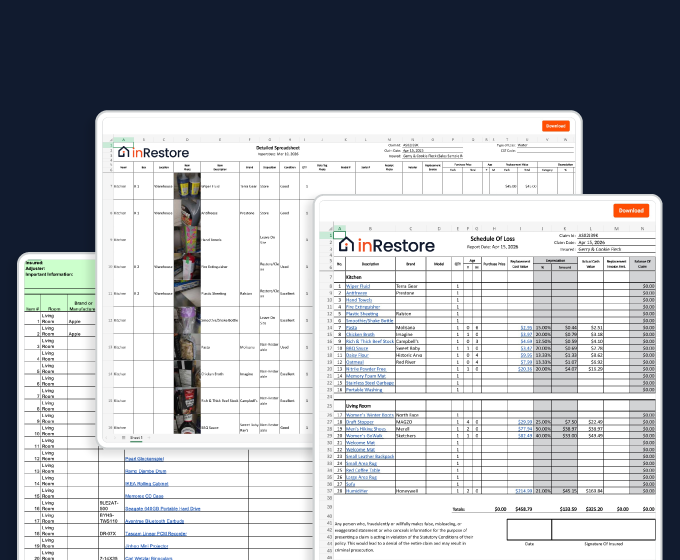
Strong contents documentation protects both your business and your reputation. Encircle makes it simple. Your field teams collect accurate data on-site, while you oversee and manage everything from the office. In this video, we’ll walk you through how to set up your account, review and edit inventories, manage boxes, generate reports, and import external lists. Everything you need to keep your content’s workflow running smoothly, efficiently, and defensively. We recommend that you watch this video all the way through, but you can use the chapter markers to jump to the exact section you need. Let’s get started. Before your team starts logging contents from the field, take a few minutes to configure your account settings. This ensures consistency, saves time on-site, and sets you up for clean, reliable reporting. You’ll need Organization Admin permissions for this step. On the left side of the screen, open Settings. Click Manage Lists. Here there are two areas to customize: Dispositions and Box Types. Your disposition list defines how items are categorized. Most teams use a few clear options like Restorable, Non Restorable, Keep As Is, Discard, Return to Customer, and so on. Keeping this list concise and consistent prevents confusion in the field and keeps reports easy to read and understand. To edit the list, click Edit Disposition List. You can add new items by typing in the bottom row. Use the trash can to delete, and drag to reorder using the three bars. Next, scroll down to the Box Types list. Click Edit Box Types to adjust the list as needed. This defines how boxes are categorized on packouts and should align with your org’s pricing structure. Examples include small, medium, large, wardrobe, mattress box, or tag for oversized items not boxed. These quick setup steps only take a few minutes, but they’ll save your field team hours of time and ensure your documentation stays consistent across every job. Managing box numbers on a pack out is one of the most frustrating parts of content’s work. When done manually, box labeling is slow, error prone, and inconsistent. Packers build whole homegrown systems just to avoid overlap. And mistakes don’t surface until you’re back at the warehouse. Your team can eliminate headaches by using QR labels for your boxes no special hardware required. Before the job generate your QR code labels from the web app. Open the job file and navigate to the Contents tab. Select QR labels. Choose your sheet format. We support several standard Avery labels and thermal labels. Add custom tags and color coding for special callouts. Job information pre populates in the text label, but can be further customized to your needs. Use the Preview area to see what your labels will look like. Set the number of sheets. To keep processing time reasonable, the number of sheets per print is capped at one hundred for Avery labels and one thousand for thermal labels. Finally, export to PDF. Your PDF will automatically save to your device. If you want to preview the PDF in your browser window, make sure to enable pop ups for Encircle. When pop ups are enabled, Label Sheets will open automatically in a new tab when you export to PDF. Open the PDF file and print. Print your labels with any standard or thermal printer. Labels are clean and professional with easy to read box IDs. For best results, use Avery five thousand one hundred sixty three and five thousand one hundred sixty four sheets and refer to Avery’s printing recommendations available on their website for optimal printer settings. For thermal printers, follow the manufacturer’s guidance for compatible label sheets and printer settings. In the field, when it’s time to assign a box, users simply point their phone at the label and scan. Because each code is unique, your techs don’t have to worry about duplicate box numbers or memorizing a naming convention. QR codes even work offline, so dead zones don’t slow your team down. Everything syncs when they reconnect. As your field team inventories contents, you can view and edit everything in real time from the web app. There are a few ways to view and manage your contents data in Encircle. The first is the Activity tab. This shows you all photos, videos, notes, and other documentation that has happened on the job in chronological order. Filter by contents to see a breakdown of items added to the job. Perfect for checking daily progress. You can click any item to review its details or make quick edits. You can correct descriptions, update dispositions or add notes directly. Upon opening the contents tab of the job, you’ll land on the inventory manager. On this page you can see all item details at once, including the box and location, so you can see at a glance exactly where each item is. Photo thumbnails are visible so that you can see each item without having to click on it. If you need to locate an item just search for it to see immediately where it is in your warehouse. Items without descriptions show at the top of the view, so that you can easily find and label them. Filtering options up top allow you to easily focus on items based on brand, disposition, location, room of origin and box type. For example, let’s filter down to our non restorable items from the kitchen. We also provide the ability for bulk editing, which is handy when you need to move items between rooms or update dispositions. For our example, we’ll sort by disposition to pull up the items that don’t have one yet. Then select multiple items and assign them a disposition. At the top right corner is the Add item menu, which allows you to upload items from your computer or create them from overview photos. The Inventory Manager view is paginated, allowing the page to load in seconds, a really important feature on any contents job with lots of items. From the left panel you can jump into other views, such as Spreadsheet. This layout displays all room media alongside the contents items. You can filter by room, disposition or box. Let’s filter our view down to the kitchen. You can edit cells directly or click into an item for more detailed changes. Boxes bring order to your contents job. They connect the physical Packout with your digital record. Click on Boxes in the left panel to view your box list for the job. At the top, you’ll see a summary of box types. A quick count of how many small, medium, large boxes, etc. Were used on the job. This is handy for billing, warehouse tracking, and verifying packing materials. Below, you’ll find the full list of boxes and the items inside them. Unboxed items appear at the top. Ideally, this section should only include items that aren’t being packed out or are being discarded. Anything being packed out should be assigned to a box, tag, etc. Field technicians will be assigning or scanning items into boxes in the field, so this page should largely be just for monitoring. However, you can add boxes and move items between them as needed. Filtering options up top allow you to filter your view by item description, disposition, room, box name, or location. For example, let’s filter by disposition to double check that none of our non restorable items got packed up. Open the locations tab to see a full list of locations on the job and which boxes are in them. A location is exactly what it sounds like a vault, pod, truck, and so on. Moving and scanning boxes into locations is largely managed by field teams in the mobile app, but you do have the ability to add locations and move boxes here as needed. Similar to all Encircle reports, generating contents reports is quick and straightforward. From the Overview tab of the claim, click Generate Report. For a full inventory, select Excel and choose All Items. Enter a report title and select the Encircle detailed spreadsheet template. Click Generate Report. To provide pre existing damage photos, generate a PDF using the Encircle PDF report template and apply the Contents Only filter. Enter a title and click Generate Report. Use this alongside the Excel file for a complete package. For non salvageable or discard lists, select the Excel report type. Instead of all items, choose Contents by Disposition and select the relevant categories such as Non Restorable or Non Salvageable. Enter a title and select the Schedule of Loss template. Click Generate Report. This makes it easy to generate non restorable lists for sign off. Another useful Excel report is the Box Summary report. This one counts boxes by type. Great for billing and warehouse tracking. If needed, carrier specific templates are also available. Contact your customer success manager or the support team to let us know what you need. Encircle reports are clean, professional, and designed to meet carrier expectations, making approvals faster and reducing follow ups. That’s it. You’re ready to configure, manage, and oversee contents workflows with confidence. Encourage your field team to visit the Encircle Learning Hub and take the Field Documentation Basics course, as well as the Contents Mobile course to help them ramp up fast. The best way to use Encircle is to get out there and use it. And remember, our help center and support team are always here to help.







 Approved CE Provider
Score 80% or higher to earn your IICRC CE credit — request your certificate in the quiz.
Approved CE Provider
Score 80% or higher to earn your IICRC CE credit — request your certificate in the quiz.