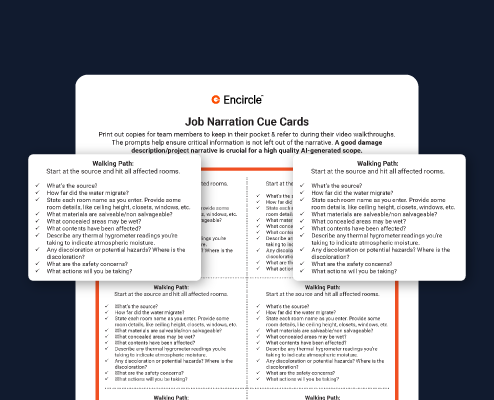
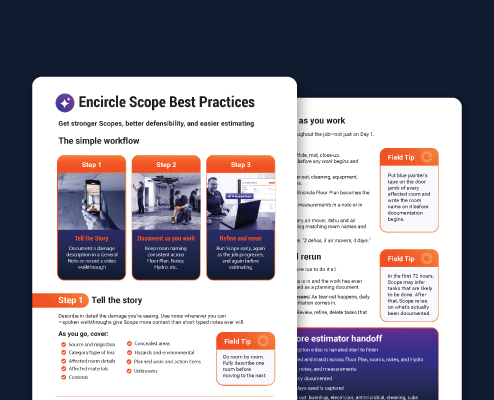
In restoration, speed matters, accuracy matters, documentation matters. But there’s one step that often becomes the bottleneck between the work and the payment: scoping. In most estimate disputes, you’re not arguing over price you’re arguing over scope. But for many restorers, scoping is not a defined process. It looks different across every business and even across staff within a business. Someone may write their scopes in a note on their mobile device. Another might write them in an email. Another might not write a scope at all and just jump directly into Xactimate. Scopes today are often built from memory, if they’re done at all. In reality, most contractors jump straight from field documentation to estimating, forcing estimators to reconstruct the scope and fill in the gaps as they’re pricing the job. And that’s where problems creep in. Line items get missed Estimators spend hours playing detective Adjusters push back Cycle time slows down Staff burns out and margins quietly shrink. Most Restorers find themselves saying we need more consistency, we’re leaving money on the table, our estimators are overloaded, adjusters push back constantly or it takes too long to get invoices out. But here’s the truth: those aren’t estimating problems they’re scoping problems. And Encircle Scope was designed to solve them. Encircle Scope is a purpose built AI scoping engine for mitigation. It automatically transforms your field documentation into a structured room by room IICRC supported scope in minutes. Scoping in Encircle is a simple three step process: Capture, Analyze, Review. It starts with the documentation your team is already collecting in photos, notes, moisture readings, floor plans, audio narration and so on. When you generate a scope, your job file is processed by the Encircle AI engine. Computer Vision Analysis scans your photos to identify building materials, fixtures, and visible damage. Damage Description Analysis extracts intent and context from your written notes and video narration, identifying things like source of loss, category, class, and affected areas. Spatial calculation ingests measurements and floor plans to calculate square footage, linear footage, and equipment recommendations. Data synthesis connects the dots across data points throughout the job. For example, cross referencing a moisture reading with a photo of standing water and a written note to form a verified, complete picture of the loss. Finally, everything is checked against current industry standards, including IICRC guidelines, to ensure the proposed work is compliant and defensible. Encircle Scope is not a chatbot or even a custom GPT. It is a purpose built, multi step inference system designed specifically for restoration. Instead of just reading your notes, it is looking at your photos, listening to your videos, interpreting your descriptions, and applying spatial logic all at the same time. In minutes, you receive a structured editable scope containing a project narrative, job tasks, IICRC justification and more. Encircle scope does the heavy lifting. Instead of starting from scratch, your PM or estimator becomes the reviewer. They use their professional judgment to audit, verify the assumptions and refine as needed. Once your documentation is in place, generating a scope is a matter of a few clicks. In the mobile app, open the Scopes page from the Home screen. Click the plus button to start a new scope. Enter a title for the scope. Select which general notes you want to include and which Rooms or Structures to include. Then click Generate Scope. In the Web App, open the Scopes tab. Click New Mitigation Scope. Enter a title for the scope. Select the rooms or structures you want to include. Then select which General Notes to include. Click Generate Scope. In minutes, the engine delivers a structured, comprehensive scope. The output includes: a project narrative professional summary of the loss, cause and timeline of events General project tasks these capture high level tasks and billable items that aren’t specific to any rooms Room by room scope: a damage summary, list of affected materials and detailed task list for each affected room. Equipment recommendations: S500 based air mover and dehumidifier counts for water losses, along with placement suggestions. IICRC references Direct citations from the S500, S520 and S700 standards to justify line items, defend against adjuster pushback or use in your F9 notes. Data Quality Assessment This highlights any missing info or assumptions made by the AI, so you know exactly what to double check. That last piece is important. Unlike generic AI such as large language models or even custom generative models that provide answers even if they have to make something up, Encircle scope calls out assumptions that were made and identifies areas where there was not enough information provided to make a determination. Instead of spending hours writing from scratch, your PM or Estimator acts as the auditor, applying their expertise to review for accuracy. This is a fully editable document, so you can choose to modify the scope directly. Or better yet, go improve the documentation in your Encircle file and run a new scope, letting the system rebuild a stronger output. Encircle scope prioritizes accuracy. You want to be sure your scope survives estimator handoff, carrier review, supplement disputes or any form of pushback. Incredible scopes start in the field. Encircle scope is powerful, but it’s not magic. If the data is not available, it won’t make assumptions about the project. You want to provide the scope engine with the necessary details about the job. So, what do you need on the job file to produce the best possible scope? You could say there are four main pillars of strong documentation: a description of the loss, measurements of the property, photo documentation and room specific information. There are various ways to capture this information in Encircle, and you can capture it in whatever way works best for your team. Just remember that these four pillars will be the foundation of your documentation strategy. Let’s break them down. Description of the Loss A good damage description or narrative is the most powerful input you can provide. You’re giving the AI engine crucial context that empowers it to expertly synthesize data across the job. The more detail you provide about the loss, the more confident it can be with its assumptions and recommendations. We strongly encourage users to do this with a video walkthrough of the property. Start in the room where the source of loss occurred and walk your way through the property, narrating as you go. The AI engine won’t use the video’s visuals for the scope, but it will extract the transcript from the audio narration that you provide. So, it’s important to be as descriptive as possible in your narration. You can speak in English, Spanish, or French. A strong walkthrough should include the following: An overview of the situation: What was the source of loss and how did the water or damage migrate through the property? Resulting damage: Which rooms are affected and what materials are impacted? Safety considerations: Are there potential hazards to consider like mold, asbestos or lead? Next steps: What actions will be required to mitigate the loss? Think of it like you’re walking a third party through the property. Make sure to state the name of each room as you walk into it. Then provide your narration for that room. The scope engine needs to know which room you’re referring to at all times. The AI is going to take this damage description and tie it together with the rest of the data on the file: your photos, notes, hydrodata, job events and so on. All of that rich contextual information drives scope accuracy. Now, let’s take a look at an example. Pay attention to how the narrator calls out each room as they walk into it, and how they provide an overview that answers the key questions about the loss. Alright. Let’s go ahead and capture the damage. So we’re in the primary bedroom. Source of loss is going to be this wall over here. What we have is we have the supply line that has become damaged in the wall, wet the carpet. As you can see, we got baseboard, drywall, and some contents. Scope of work, we’re gonna need to extract the carpet, lift the carpet out, potentially remove the padding. We’re also gonna have to detach the baseboards and manipulate this furniture. In the next room, we have a little bit of hardwood floor in the hallway, and it appears that the walls are wet as well. We’ll confirm that with a meter, but we’re definitely gonna have to utilize some drying for the floor, remove the baseboards, and also apply drying techniques there. It looks like we come into this bad the oh, it looks like the other bedroom is affected. As we come into the bedroom, the carpet is is definitely wet. The padding is wet. We have some tile here that is still wet. We have drywall baseboards installed. Okay. Looks like we’re gonna have to detach the baseboards and do some additional drying there. I don’t think we’re gonna have to do any drywall removal whatsoever. It appears this is all good water that came from a supply line. We’ll confirm, but as of right now, no no other work. Then we still have the bathroom and yes. The bathroom is affected. In this room, we have a vinyl flooring, that is definitely affected. It looks like the yep. We got some damage on the vanity as well. So in here, no baseboard. So let’s go ahead and detach that vanity and that toilet and get this floor out of here for sure. There’s there’s gonna be some problems with that. And then we can set up containment basically at this area here for the entire opening. That’ll work for that. Regarding equipment and sizes, we’re going to have to do calculations for that. Property Measurements If you want accurate quantities on your tasks and your equipment recommendations, property measurements are a must. Scope uses spatial information to calculate square footage, linear footage and equipment recommendations. There are a few ways you can provide this info. The fastest and easiest way to do it is with an Encircle Floor Plan. A simple video scan of the property results in a detailed Floor Plan with highly accurate measurements. Alternatively, you can enter this data into Hydro or into a Room Note. If you’re using Hydro on a water job, you’ll be prompted for room dimensions as part of the job setup. Or you can simply open up a room, add a note, label it Room measurements and clearly add the length, width and height of the room. If you know the dimensions of the room at the time of your walkthrough, you can state them in your description. No matter how you provide measurement data, the AI will use it to add quantities to your tasks and make equipment recommendations, giving you the best possible scope. Note that while measurements will give you an optimal output, you can still get a solid scope even without them. Even with a few photos and a damage description, you can turn around a prospective scope of work within minutes of arrival. Without measurements, you won’t have quantities or equipment recommendations yet. But the Quick Prelim scope can be used to get all parties aligned on the facts of the loss and establish a plan of attack right away. You can easily run a more detailed scope once you’ve got your measurements, hydro data, notes and other info added to the file. Photo Documentation Photos are the eyes of the scope. They provide the visual justification for everything that’s written and said. Encircle Scope uses visual documentation to identify building materials and fixtures, confirm visible damage, validate what’s described in your notes and job narration, understand room boundaries and layout, and cross reference with moisture readings. Three sixty photo documentation is a fantastic way to capture immersive room overviews. With a Ricoh Theta camera, you can take these photos live in the app. Or you can upload three sixty photos to the job if you are using another type of three sixty camera. If not using a three sixty photo for your overview, make sure you’re grabbing photos from each corner of the room, or snap them from one side of the room to the other in a three sixty manner. Once you’ve got your overview, make sure to capture detailed photos for each room. Take photos of the specific damages, show the equipment in place, containments erected, baseboards, material transitions, any mold that you find behind the walls, and so on. If you’ve used photo markup to flag something extra important, scope will see that too. You’re not just taking photos of wetdrywall You’re helping the scope engine understand material type, extent of damage, trims and built ins, fixtures, appliances, demo and more. You’re giving it eyes to see the loss. Room Specific Information Estimates are written room by room, so you want to help the AI engine understand the rooms on the job. Start by using rooms as intended. Avoid having rooms labeled Before and After, Day one, Inspection, or anything along those lines. This is not a clear way to label the file and is not optimal for scoping. It is also best to avoid slashed room names like LaundryMudroom or EntrywayLaundry. Choose one name for each room. Any room with a door should be set up as a separate room in Encircle. For example, say you have a master or primary bedroom with a walk in closet. The bedroom and the closet would each be a room, and they should be labeled Master bedroom and Master closet, or something similar. When you have multiple bedrooms, closets, bathrooms, etc, follow a simple naming convention across the job file. We suggest something like Master Bedroom, Bedroom one, Bedroom two, Bedroom three, and so on. For bedroom closets, use master closet, closet one, closet two, closet three, etc. For bathrooms: master bathroom, bathroom one, bathroom two, bathroom three, etc. For hallways: Hallway one, Hallway two, Hallway three, etc. Hallways usually have closets, so use Hallway closet one, Hallway closet two, Hallway closet three, etc. When room names are sequential, it helps keep things straight, and it makes it clear which closet belongs to which room. It’s also recommended to have your Floor Plan rooms labeled the same as your job file. You can update these in the Quick Editor online. Just open the Floor Plan. Click Fix Scan. Select a room label and enter the new name. This really helps the Scope engine maintain clarity across the job file as to which room is which. The Video Walkthrough is the gold standard for providing a damage description, but Notes are another way to provide that information, if that’s your preference. For each room, make sure that you’re including details like what materials and fixtures are present, which materials are impacted, salvageable and non salvageable materials, closet and window conditions, safety concerns, and proposed work. By using note templates, you can ensure this information is captured thoroughly and consistently across technicians and across jobs. You can easily set up note templates in your org settings, and they’ll be available immediately for your team in the field. Field users can simply open up a new note, select a template and respond to the prompts. Pre filled templates remind your team what to capture so that critical info is never missed. Common note templates include daily summaries, source of loss, site checklists, and much more. For water mitigation specifically, Hydro data adds another layer of validation. Within the Hydro workflow, you’ll be capturing additional data points for the rooms in your chambers: moisture readings, psychometrics, equipment recommendations, equipment placement, and daily visit logs. This hydro data provides validation against the other documentation in the file. For example, if you didn’t mention carpet in your damage description, but you’ve got some photos of dark carpets, the AI engine won’t know from visual analysis alone whether that carpet is wet or dry. But with Hydro, you’ve got material readings that show the saturation. Combined with your damage description, measurements, photos, notes and other documentation, Hydro data completes the picture. Here’s the big takeaway: Your documentation no longer just justifies the scope. Your documentation now creates the scope. Encircle scope isn’t just about writing down tasks or quoting the standards, it’s about operating differently. It standardizes quality across technicians, PMs and branches. It protects margins by identifying missed work. It reduces estimator detective work. It improves defensibility with adjusters. It transforms documentation into operational clarity. And it does all of that in minutes, without asking your team to change how they work in the field. Capture your job in Encircle. Generate the scope. Review, refine, deliver. That’s the shift. And that’s Encircle Scope. The best way to learn Encircle is to get out there and use it. Our Help Center and our Support team are here for you to answer any questions that come up.







 Approved CE Provider
Score 80% or higher to earn your IICRC CE credit — request your certificate in the quiz.
Approved CE Provider
Score 80% or higher to earn your IICRC CE credit — request your certificate in the quiz.