Anybody that’s been in this industry for a while knows how hard it is to get paid some days. And that’s a huge bump that, we weren’t seeing before with our other provider.
Brandy Millwood
Spangler Restoration
Fix your cashflow at the source
22% of restoration revenue is tied up in unpaid invoices
Easy, on-the-spot collections
Request and collect payments in seconds in the field
Improved cash flow
Collect deposits and deductibles before the work begins
Better customer experience
A more secure and convenient payment method
Fewer tools to manage
Integrated into the app you’re already using in the field
As simple as: Tap, get paid
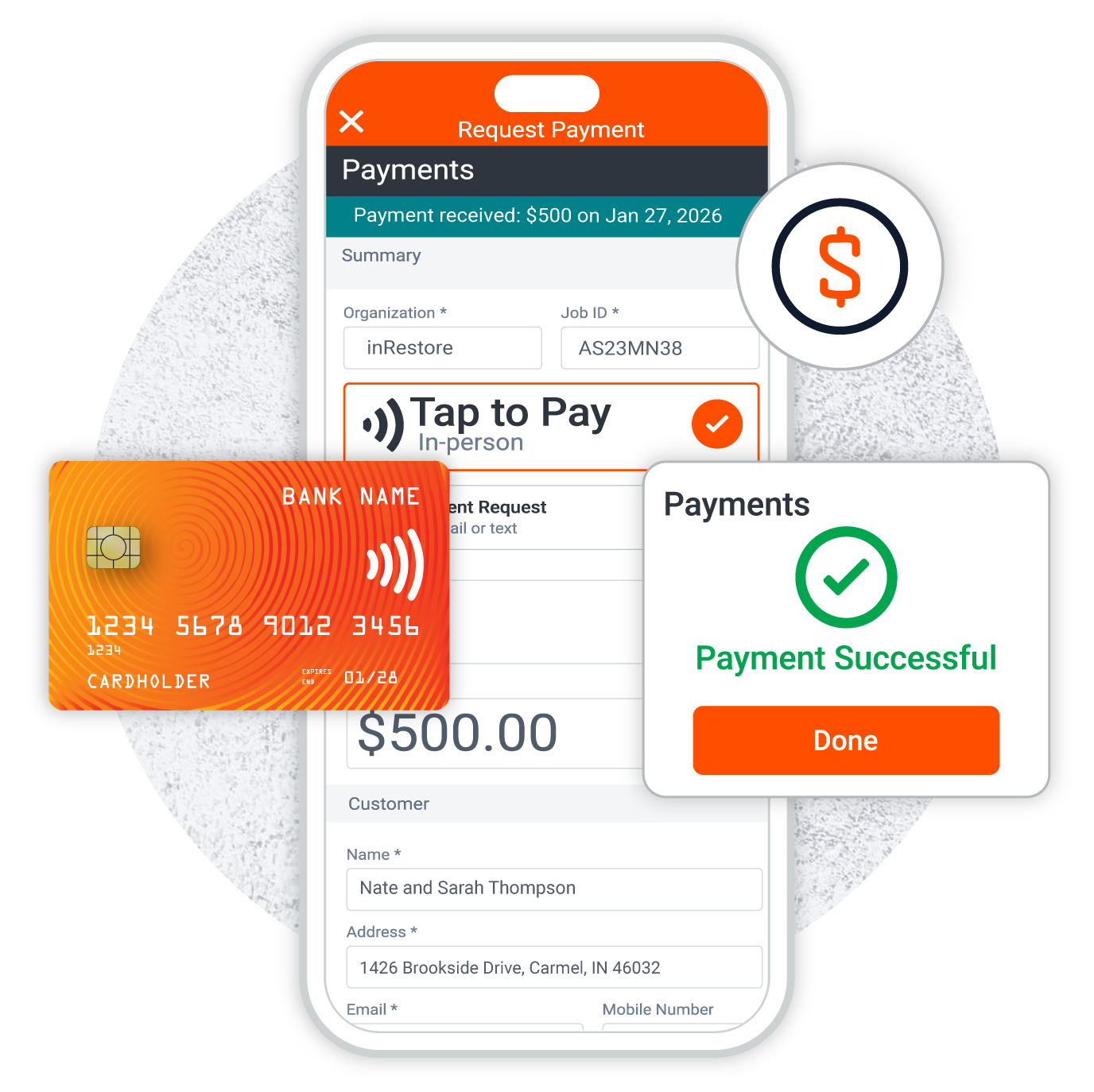
Collect payments in-person with a simple tap on your phone–no hardware needed.
Send secure links for credit card or ACH payments directly from the Encircle app.
Homeowners get receipts via email. Easy for you and a great experience for them.
With no seat fees for users, anyone on your team can request and collect a payment.
Reliable, secure, and trusted by millions of businesses around the world
Restoration moves fast until it doesn’t. You get called to an emergency, get on-site, get to work, and then wait for approvals, for answers, for payment. With the launch of Encircle payments, restorers can now collect one time payments like deposits and deductibles right from the field before the job even starts. Powered by Stripe, transactions are securely processed and fully compliant with PCI standards, so you can focus on what really matters. Request and collect contactless payments through TAP transactions or by sending secure text or email links. Payment records will automatically sync to job files. From documentation to mitigation to floor plans and now Encircle payments, it all happens in one platform. With everything in one place, your team has complete context across the job. No chasing details or entering data twice. By collecting deposits up front, you improve cash flow and reduce the risk of unpaid work. Homeowners get a smooth professional experience with branded payments and instant receipts. Encircle payments is available in the US and Canada and included in every subscription. It’s one less thing to chase and one more thing you can do with Encircle.
Why collect payments with Encircle
VS CompanyCam
VS AlbiPay
Limited payments, added friction
Higher costs, fewer capabilities
CompanyCam supports mobile payment requests but lacks Tap to Pay and does not include payments as part of its core subscription. With a 3.0% processing fee and limitations on users, teams may need to rely on additional tools or workflows to fully manage collections in the field.
AlbiPay offers payment processing but comes with higher costs, including a 3.2% fee plus $0.30 per transaction. It does not support Tap to Pay or mobile payment requests and isn’t bundled into a broader field workflow tool, which can mean more friction and extra tools for teams trying to collect payments efficiently.
How to get started
Get the cash flowing today
Initial setup
Set up your Stripe account* in Encircle and connect your bank details. *requires Admin permissions
Collect a payment
Step 1
Select the job that requires a payment.
Step 2
Fill in the amount and add a description.
Step 3
Have the customer Tap to Pay right on your phone or send them a payment link.
Perfect for restoration jobs where every dollar counts
Emergency water mitigation
Collect a deposit before placing a dehu. No upfront payment = no commitment.
Rebuild deductible collection
Secure the homeowner’s portion of the claim before your team swings a hammer.
CAT response
Keep crews moving fast and homeowners feeling confident in high-stress, high-volume events.
Uninsured upgrades
Give customers a fast, professional way to pay on-site for change orders or upgrades.
Frequently asked questions
As soon as you complete the Stripe sign up process, you’ll be ready to start collecting payments.
Standard processing rates apply and there are no transaction fees.
Tap to Pay rates: Visa Mastercard, Discover (US & iPhone only) 2.95%, American Express 3.5%, Interac Debit (Canada) 1% with $15 cap
Payment link rates: Visa Mastercard, Discover (US) 3.2%, American Express 3.5%
ACH rates: ACH 1% with $15 cap
Not right now. We’re actively exploring this, keeping federal and state laws in mind.
Yes, depending on the homeowner’s card limits. For Tap to Pay in Canada, there’s a $250 cap set by financial institutions.
Not yet—but we’re exploring options for future integration.
Encircle is partnered with Stripe, which is trusted by millions of merchants around the world, to ensure secure processing and compliance with PCI standards. All of your banking and customer payment information is stored in Stripe, which you can access from your dashboard.
Nope. Tap to Pay works using any compatible mobile device your team already has.
Anyone you give access to. With unlimited users, there’s no bottleneck—no matter who’s on site.
While Encircle does not offer a direct QuickBooks integration, you can connect your Stripe account to QuickBooks using a 3rd party tool from the QuickBooks App Store. You can learn more about it here.
Encircle Payments is here
Book time with our team to explore how Payments fits your workflow. *Payments is only available in the USA and Canada